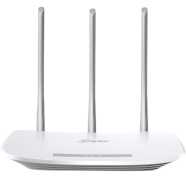
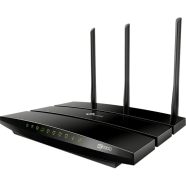
TP Link 3 Antenna Router Online in Bangladesh
Looking for a reliable Wi-Fi router with extended coverage? A 3 antenna router provides superior signal strength and wider coverage compared to single or dual antenna models, making it perfect for medium to large homes and offices in Bangladesh. This guide will help you choose the best 3 antenna router for your needs.
What is the Price of TP Link 3 Antenna Routers in Bangladesh?
The price of 3 antenna routers in Bangladesh ranges from ৳1,200 to ৳10,000, depending on the brand, specifications, speed capabilities, and additional features.
Best TP Link 3 Antenna Router Products in Bangladesh
This TP Link 3 Antenna Routers blender list has been created based on search popularity, customer preferences, and buying trends among Bangladeshi consumers at Rokomari.com.
| Product Name | Price | Link |
| TP-Link TL-WR845N 300Mbps Wi-Fi Wireless Router | TK. 1,750 | View Product |
| TP-Link AC1900 Dual-Band Gigabit Wi-Fi Router | TK. 8,066 | View Product |
How to Choose the Best TP Link 3 Antenna Router
Step 1: Determine Your Speed Requirements
Consider your internet plan speed and usage patterns—300Mbps routers are sufficient for basic browsing and HD streaming. For 4K streaming, online gaming, or homes with multiple heavy users, choose routers with 600Mbps or higher speeds.
Step 2: Assess Coverage Area and Home Size
Evaluate the size of your home or office—small apartments (up to 1000 sq ft) work well with basic 3 antenna routers. Larger spaces (1500+ sq ft) or multi-story buildings require routers with stronger signal amplification and dual-band capabilities for optimal coverage.
Step 3: Check Wireless Standards and Band Support
Look for routers with at least 802.11n standard for basic needs, or 802.11ac for better performance and future-proofing. Dual-band routers (2.4GHz + 5GHz) reduce interference and provide faster speeds for compatible devices compared to single-band models.
Step 4: Consider Ethernet Ports and Connectivity Options
Check the number and speed of LAN ports—basic routers offer 10/100Mbps ports while premium models provide gigabit (10/100/1000Mbps) ports. Ensure the router has enough ports for wired connections like gaming consoles, smart TVs, or desktop computers.
Step 5: Evaluate Security Features and Additional Functions
Prioritize routers with WPA3 or at least WPA2 encryption for network security and password protection. Look for useful features like guest network support, parental controls, QoS (Quality of Service) for bandwidth management, and easy mobile app setup.
Explore More Networking Products from Rokomari.com
Router Categories: Gaming Router | 2 Antenna Router | Deco Router | TP-Link AC1200 Router | AC1200 Router | Gigabit Router
Browse our complete collection of Networking and Wi-Fi Accessories and Routers to find everything you need for a powerful, reliable home or office network!





 Hello, Sign in
 Cart
Cart